Purpose of the Implementation
This app handles a lot of sensitive information: license plates, car color, GPS coordinates, timestamps, and sometimes image evidence. All of that needs to move from the phone, through the backend, and into a PDF report for the police.
So the purpose here wasn’t to write one specific feature, but to make sure the entire flow from “scan a car” to “generate a report” is secure and consistent.
That meant designing a pipeline that:
- verifies who the user is (JWT)
- protects data in transit (HTTPS/TLS)
- validates and separates inputs (DTOs, GUID constraints)
- stores metadata and images safely (EF Core, 1:1 tables)
- avoids SQL injection (LINQ + repositories)
- keeps changes consistent (Unit of Work + transactions)
- exposes only what clients actually need (separate endpoints for metadata vs images)
This post is basically meant to showcase how every other topic ties into each other.
Disclaimer: This blog is meant to showcase the planned flow of the finished app. Some features are not implemented yet, and it doesn’t cover the web app, only the mobile app.
What I built
Below is the diagram that summarizes the flow from the road worker’s device to the backend and eventually into the police-ready PDF.
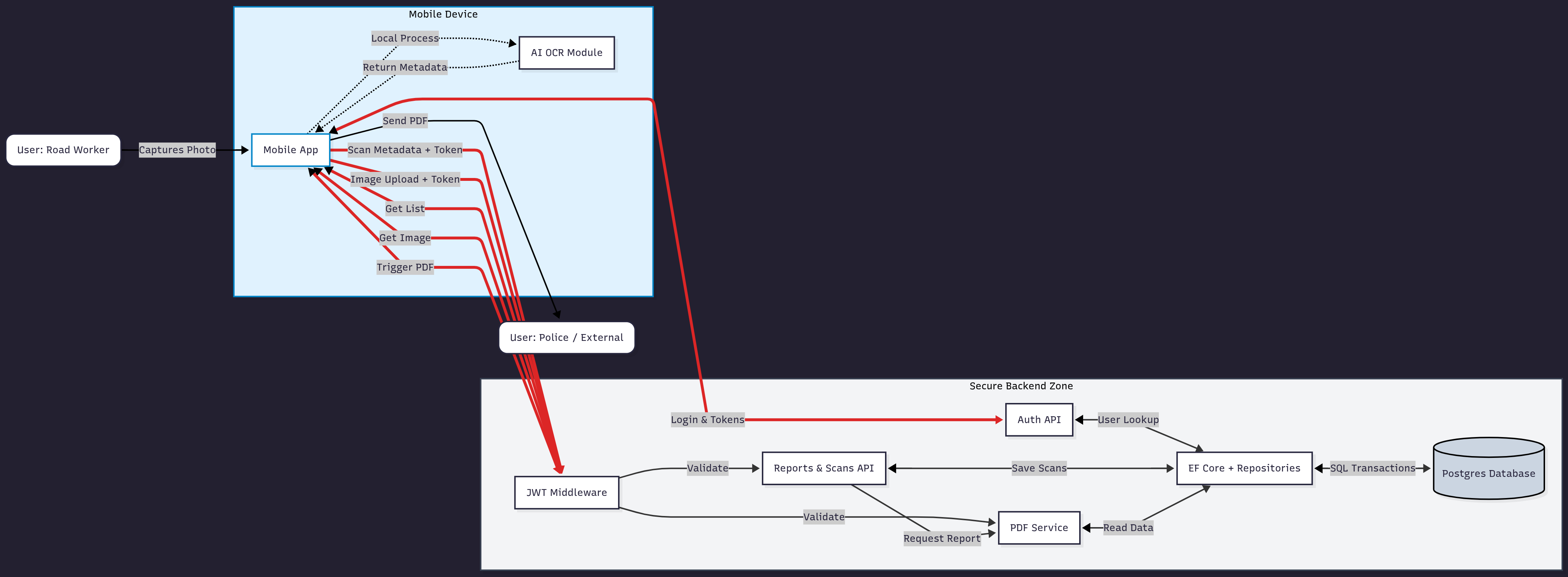
Instead of showing a lot of code, it makes more sense to break the flow into stages.
Logging in and getting a token
The road worker logs in through the mobile app. The request goes to the backend’s Auth API, where the password is verified against the BCrypt hash in the database. If correct, the backend issues:
- a short-lived JWT access token
- a long-lived refresh token (stored in the DB)
All future requests must include the access token.
See JWT Authentication & Token Rotation.
Scanning cars on-site (metadata only)
The phone’s local AI/ML pipeline extracts the car’s license plate and color.
The app sends only metadata (plate, GPS, timestamp, etc.) to:
POST /reports/{id}/scans
Authorization: Bearer <access token>
The backend:
- validates the JWT
- validates route parameters
- stores the scan using EF Core
See:
- Hashing in Csharp With BCrypt & JWT Authentication & Token Rotation (part of login)
- Protecting Against SQL Injection Using EF Core
- Transactions and Unit of Work Through EF Core
Adding a scan with image evidence
When an image is needed, the app uses the image-enabled endpoint:
POST /reports/{id}/scans-with-image
The service attaches the binary image to a one-to-one ScanImage entity and saves everything in one transaction.
See: Storing Images in Databases vs External Storage
Listing scans without loading images
When listing all cars for a report, only metadata is loaded.
This avoids sending large blobs unless they’re specifically requested.
See: Storing Images in Databases vs External Storage
Fetching a single scan image
If the client needs an image preview or evidence for the PDF, it calls:
GET /reports/{id}/scans/{scanId}/image
Only this one image is loaded.
See: Storing Images in Databases vs External Storage
Securing communication with HTTPS/TLS
All communication in a real deployment must go over HTTPS/TLS, ensuring plates, GPS, and tokens are never exposed in plaintext.
See: Securing API Communication With HTTPS or TLS
Generating the final PDF for the police
Once the worker is done scanning the parked cars, the backend fetches the relevant scans (and optional images) and generates a PDF containing:
- Worker identity
- Case number
- Address information
- scan list
- signature metadata
What I learned
The intention of this blog was to show the considerations we had at the start of the project and how the different tools we used ended up covering those needs.
It also highlights that we tried to approach the system with security by design in mind—thinking about authentication, input validation, safe database access, and data separation from the moment we planned the flow.